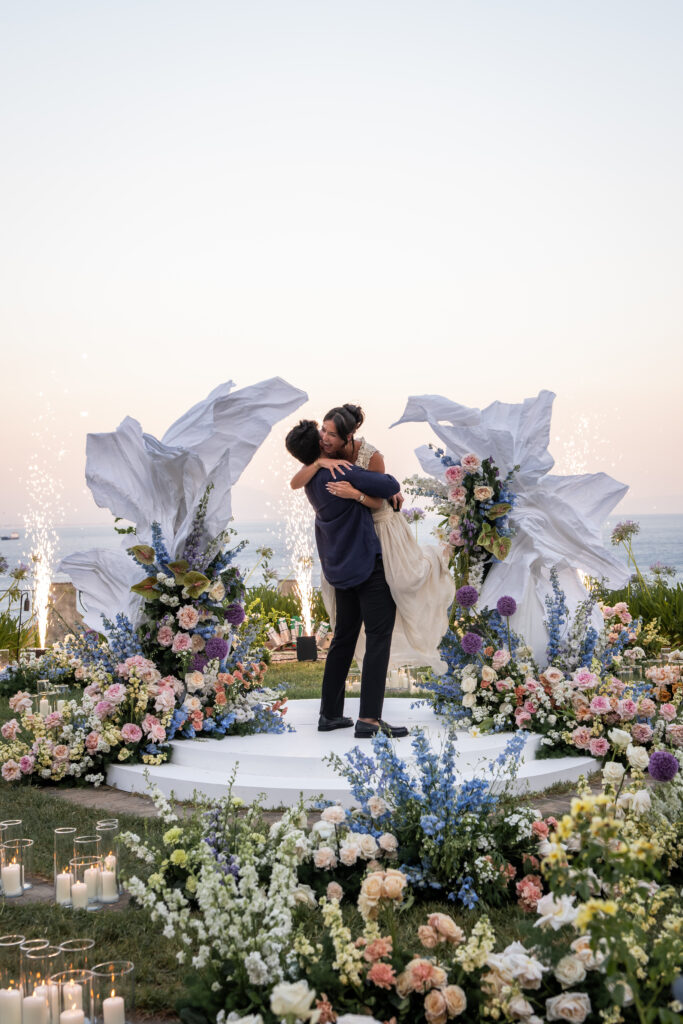





You’ve got the ring, the plan, and someone hiding behind a tree with your phone ready to hit record. What you probably don’t have is a fancy high-speed camera rig, which is usually the only way to get that gorgeous, slow-motion ring reveal you’ve seen in professional proposal films. An AI Slow Motion Video Maker incorporated perfectly in Higgsfield is changing that, letting you take footage shot on a completely normal phone and turn the actual moment your partner said yes into the kind of smooth, cinematic slow motion you’d expect from a professional videographer, as long as it’s still genuinely your real moment, not a recreated one.
Why Does Slow Motion Make Such a Difference in Proposal Videos?
There’s a reason wedding and proposal videographers reach for slow motion so often. The moment someone drops to one knee, the second the ring comes out, the exact instant your partner’s face changes, these are the beats that carry all the emotion, and slowing them down gives you time to actually see every bit of it. A proposal happens in real time, in a blur of nerves and adrenaline, and slow motion is basically a way of giving yourself permission to relive it more slowly than it actually happened.
Think about the professional proposal videos that make you tear up watching them, even when it’s a total stranger’s engagement. It’s almost never the wide shot of the whole scene that gets you. It’s the close-up, slowed way down, of the exact second her hand covers her mouth or his voice catches mid-sentence. That’s not an accident of editing style, it’s a deliberate choice, because slow motion turns a moment that lasted half a second into something you can actually sit with and feel.
What’s the Problem With Getting Slow Motion From Regular Phone Footage?
Here’s the catch most people run into. True slow motion, the kind that looks smooth instead of choppy, traditionally requires filming at a much higher frame rate than normal video, which means either a dedicated camera setting turned on in advance, or professional equipment most people simply don’t have on hand during their own proposal. If you or your hiding friend forgot to switch your phone into slow-mo mode before the big moment, you’re usually stuck with regular footage that looks jerky and unnatural if you just slow it down after the fact in a basic editing app.
This is one of the most common regrets couples mention after the fact, right up there with wishing they’d hired a photographer. The proposal itself goes perfectly, the reaction is everything you hoped for, and then you go to relive it in slow motion and realize the footage just wasn’t shot that way, leaving you with either accepting the choppy result or trying to describe the moment to people instead of actually showing them.
How Does AI Actually Fix Footage That Wasn’t Shot in Slow Motion?
This is where it gets genuinely useful. An AI slow motion tool doesn’t just stretch out the existing frames, it uses AI frame interpolation to actually generate the missing frames in between the ones you have, so the motion stays fluid instead of stuttering. Higgsfield’s version of this is specifically built to handle fast, complex motion without the artifacts and blurring that trip up older slow-motion tools, which matters a lot for a proposal video, since the exact moment you want to slow down, a hand reaching for a pocket, a face breaking into a smile, tends to involve quick, complicated movement.
That distinction genuinely matters more here than it would for a lot of other video content. A lifestyle brand slowing down a product shot has the luxury of reshooting if the first take looks rough. You don’t get a second take of your own proposal, which is exactly why a tool built to handle real, unpredictable human motion well, rather than the smooth, controlled movement of a staged commercial shoot, matters so much for this specific use case.
What Should You Actually Do With This When Editing Your Real Proposal Video?
Use it on the footage you actually captured, the real reaction, the real moment, slowed down to let that emotion land the way it deserves to. Don’t use it to generate a fake version of a moment that didn’t happen the way it’s shown, or to recreate a proposal after the fact and pass it off as the real thing. Your proposal video means something specifically because it’s real, and that’s worth protecting even when you’re using a tool this powerful to make it look more polished.
What Happens When You Want a Cinematic Proposal Video but Didn’t Plan the Camera Settings in Advance?
This happens to genuinely almost everyone. You’re so focused on the ring, the location, and not tripping over your own words that camera settings are, understandably, not the top priority in the moment. By the time you realize you wish you’d captured the ring reveal in slow motion, the moment’s already happened, and there’s no going back to reshoot it.
This is genuinely different from most other kinds of video regret you might have. If you forget to charge your camera battery before a birthday party, you can throw another party. A proposal, by definition, only happens once for that particular relationship, which is exactly why the footage you actually captured, however it was shot, is the only real record you’ll ever have of it.
What Are the Traditional Options for Getting Slow Motion in a Proposal Video?
Filming in slow motion mode from the start is one option, and it produces genuinely smooth results if you remember to actually turn it on beforehand. Slowing down regular footage using basic editing software after the fact is the more common reality, but it usually looks choppy and unnatural since the software is just stretching out frames that were never meant to be spread that thin.
Both options come with real trade-offs worth naming honestly. Filming in slow-mo from the start produces genuinely great results, but it requires remembering to switch the setting before the moment happens, which is exactly the kind of small logistical detail that gets forgotten in the middle of planning a proposal. Slowing footage down afterward in a basic app is available to literally anyone with a phone, but the choppy, stuttery result rarely matches the smooth, professional look you’re actually hoping for when you picture the final video.
| Filming in slow-mo from the start | Basic editing app slow-down | AI Slow Motion Video Maker | |
| Requires remembering to set it up beforehand | Yes | No | No |
| Smoothness of the result | High, if set up correctly | Low, often choppy | High, with AI-generated frames |
| Works on footage you already have | No | Yes, but limited quality | Yes |
| Best suited for | A planned, professional shoot | Quick, low-stakes edits | Salvaging a real, once-in-a-lifetime moment |
How Does This Actually Fit Into Editing Your Own Proposal Video at Home?
An AI Slow Motion Video Maker, available through Higgsfield, lets you upload the real footage from your phone and turn the key moment into smooth, cinematic slow motion within minutes, no professional editing software or high-speed camera required. If you’re already putting together your own proposal video the DIY way, this is one more step that fits right in alongside trimming clips and adding a song, not a whole separate skill you need to learn.
That accessibility matters because most people putting together their own proposal video are already juggling a lot, the actual planning, the nerves, the logistics of getting everyone in position without tipping off their partner. A tool that slots into an existing DIY workflow, rather than requiring you to learn an entirely new piece of software from scratch, is genuinely more realistic for someone editing a proposal video the week after the actual event, in whatever spare time they can find.
What Must Stay Real When You’re Editing a Proposal Video This Way?
This is the one thing worth being genuinely careful about. A proposal video means something because it documents something that actually happened, so the slow-motion moment you’re enhancing has to be your real reaction, not a restaged or fabricated version of it. Use Higgsfield’s tools to make your real moment look and feel more cinematic, never to create a version of your proposal that implies something happened differently than it actually did. The whole reason people cherish these videos is that they’re real, and that’s worth keeping intact no matter how polished the final edit looks.
What Can You Build Beyond Just the Slow-Motion Ring Reveal?
Slow motion on the key moment is a great starting point, but it’s genuinely just one piece of putting together a full proposal video, and it pairs naturally with the kind of practical, step-by-step advice already covered in The Yes Girls’ own guide to making a proposal video yourself, which walks through camera angles, sound, and simple editing choices for exactly this kind of DIY project. Higgsfield AI is a native AI creative suite, which offers advanced AI image, video, and voice generation, editing, and upscaling tools. That means the same workspace can also help with supporting photo edits from the same proposal.
Does This Replace the Actual Planning and the Real Moment Itself?
No, and honestly, nothing should. What makes a proposal video worth watching over and over is the real moment behind it, the nerves, the setting, the way your partner actually reacted. A tool like this speeds up making that real moment look more polished on screen. It doesn’t create the emotion, plan the proposal, or replace the actual love story that makes the video worth keeping in the first place, long after the wedding itself.
What Should You Look for in an AI Slow Motion Tool for This Kind of Use?
The ability to work from your own real footage matters most, since the whole point is enhancing something that actually happened, not generating something new. Smooth handling of fast, complicated motion matters, since the exact moment you want to slow down is rarely a simple, steady shot. And ease of use matters, since you’re planning a proposal, not learning professional video editing software on top of everything else you already have on your plate.
What Are the Key Takeaways for Couples Editing Their Own Proposal Videos?
- AI frame interpolation can turn regular, normal-speed phone footage into smooth slow motion, without needing to have set your camera to a special mode ahead of time in advance.
- An AI Slow Motion Video Maker like Higgsfield helps couples enhance their real proposal footage without professional equipment or specialized editing skills of any kind.
- Every slow-motion edit should apply to your real, actual reaction, never a restaged or fabricated version of the moment you’re supposedly documenting.
- This kind of tool speeds up making your proposal video look cinematic but doesn’t replace the real moment and real emotion that make it worth keeping forever.
What Are Some Frequently Asked Questions About This?
Can an AI Slow Motion Video Maker actually be used to create a fake proposal moment?
It shouldn’t be used that way. The tool is meant to enhance real footage of something that actually happened, never to fabricate a moment or pass off a recreated scene as the genuine, authentic reaction it’s meant to represent.
Do I need to have filmed in slow motion mode for this to actually work?
No, that’s the whole point. The tool works on regular footage shot at a normal frame rate, which is genuinely useful if you forgot to switch your camera settings in the excitement of the moment itself.
Do I need video editing experience to use this kind of tool?
No. Uploading your existing footage and selecting the moment you want to slow down is enough to get a usable, polished result without any prior editing experience whatsoever.
Is this only useful for the ring reveal, or does it help with other parts of a proposal video too?
It helps with other moments too, since the same approach works for any part of your footage where slowing things down would genuinely add emotional impact, a hug, a laugh, a tear, not just the exact second the ring actually appears in the frame.
Written by: Pratiksha Joshi